Architecture Overview
HS Observatory separates physical field models, spacecraft sampling, instrument errors, storage, and analysis. Its main user-facing stages are generation of an observation HDF5 product and analysis of that saved product. A separate visualization workflow animates mission CDF geometry directly.
Architectural areas
Open the overview SVG to zoom in.
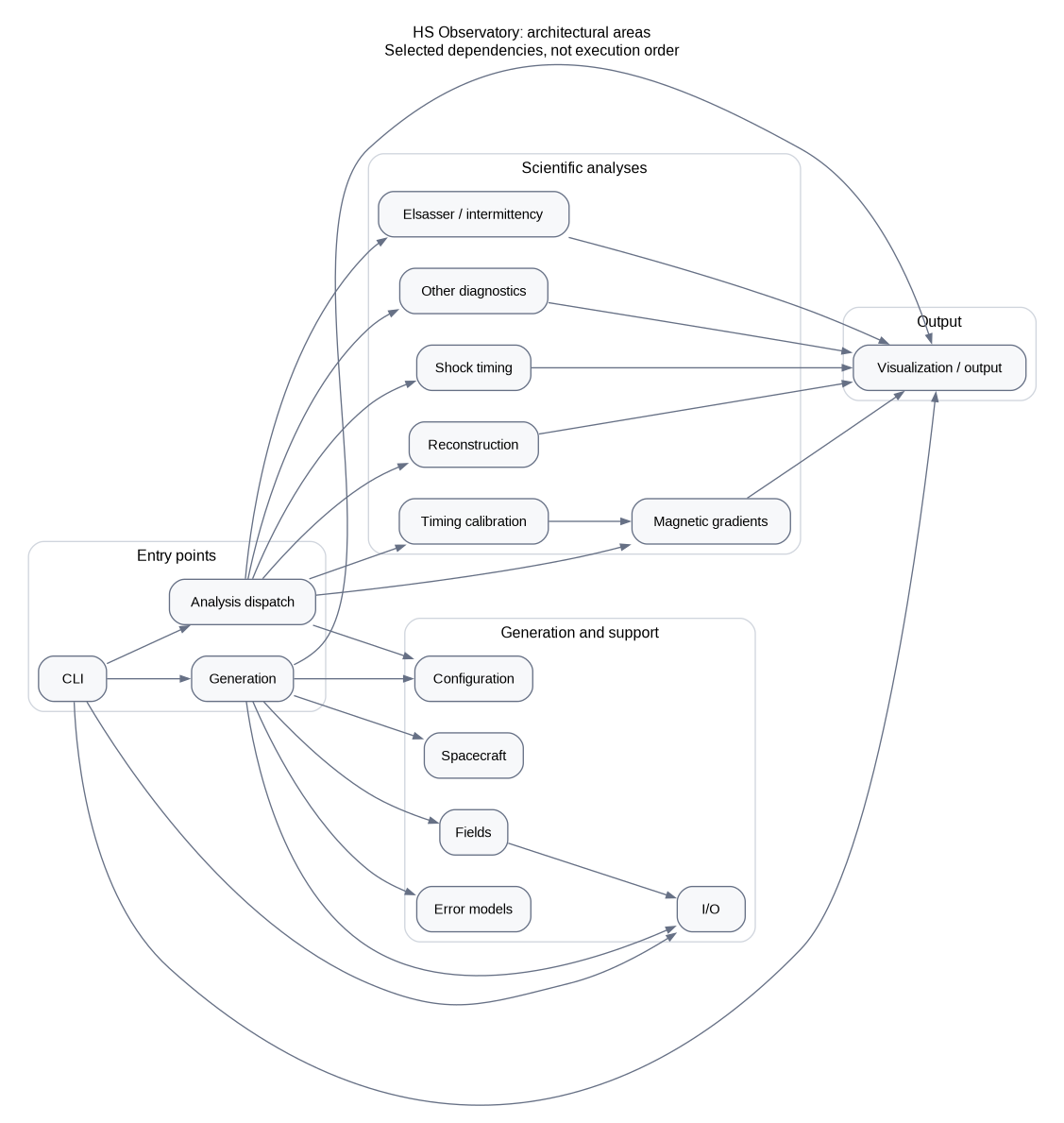
This generated overview groups source modules into responsibilities and shows selected dependencies supported by the AST import graph. It deliberately omits secondary plotting entry points, low-level utilities, internal family edges, and shared validation/helper dependencies. Node and arrow tooltips in the standalone SVG identify member modules and the source imports supporting each arrow.
The arrows are not an execution sequence. A conceptual workflow also includes configuration choices and data moving through saved HDF5 products, which need not create Python import edges. For the complete default static view, see Module Dependencies.
Responsibilities
Orchestration and CLI. cli provides most installed commands; config loads
and validates YAML. generate and analyze coordinate the two principal stages.
The hsobs-visualize entry point is declared separately as
hs_observatory.geometry_movie:main; its geometry-movie subcommand handles
the geometry-only movie workflow. The overview groups both command modules
under CLI, with source-backed dependencies on CDF I/O and visualization.
Generation. The generator constructs time grids, samples nominal and perturbed coordinates, applies measurement errors, and writes observations. Its workflow is described in Generating Synthetic Observations.
Fields. fields supplies the common evaluation interface and configurable
analytic, turbulence, PLUME, and simulation-sampling implementations.
Spacecraft and configuration. spacecraft.configuration represents spacecraft
positions and velocities. CDF loading and synthetic fallback connect these
geometries to the measurement time grids.
Error models. errors contains coordinate-offset models, Gaussian and
Ornstein–Uhlenbeck measurement errors, and the observatory requirement model.
Sampling perturbations and measurement errors have distinct roles.
The advanced import locations fields.factory.field_from_config and
errors.factory select concrete models from configuration. The latter exposes
error_model_from_config, time_offset_model_from_config, and
position_offset_model_from_config. fields.base and errors.base define the
common field and measurement-error interfaces; errors.offsets defines the
coordinate-offset interface. Concrete modules implement the models.
These factories are currently re-export facades: their implementations and old
import paths in fields.sine_sum, errors.gaussian, and errors.offsets remain
available. Consequently, the detailed graph still routes through those modules.
The existing hs_observatory.errors convenience exports are also preserved;
these selectors are not part of the small package-root API.
I/O. io reads trajectory/simulation inputs and reads or writes observation
HDF5 products. Analysis-specific modules also manage their own derived products.
Analysis dispatch. analyze selects a class through analysis.registry.
Registered classes implement the AnalysisMethod interface and handle execution
and output for their method.
Scientific analyses. Shared Elsasser and pair utilities support intermittency analyses; other families cover magnetic gradients, reconstruction, and spectral or spatial diagnostics. The Analysis Methods page documents the available methods.
Visualization and output. The package visualization module supplies common
time-series and geometry figures. Scientific modules also contain specialized
plots and product writers. Standalone helpers in the repository's visualization/
directory inspect reconstruction products and export them to ParaView; those
helpers are outside the package-only graph.
Geometry movie workflow
Movies follow this independent path:
Mission CDF snapshots → existing static geometry plots → PNG frames → GIF/MP4.
geometry_movie loads CDF data once through io.cdf_positions, selects the
nearest record for each requested time, and passes its positions to
visualization.plot_geometry_summary. The overview, polyhedra, and formation
variants retain their static styling and show the frame epoch. PNG frames
are staged before imageio assembles each animation; MP4 uses imageio-ffmpeg.
Encoder dependencies are checked only for an actual rendering/encoding run,
so help and preflight remain available without the optional movie extra. This
path does not invoke observation generation, field evaluation, measurement
errors, or HDF5 output.
Updating the diagrams
From the repository root:
python3 scripts/generate_architecture_graph.py
The script emits both DOT files and, when Graphviz dot is available, both SVGs.
See Documentation Development for build commands.
Timing calibration (including affine, influence and noise helpers) and shock timing now have separate overview groups. Shock field generation remains in Fields. Every displayed edge still requires a source-import witness.